Why Packaging QR Codes Work
Physical packaging has always been a limited canvas. Regulatory requirements, ingredients, safety warnings, brand messaging, and instructions all compete for the same finite surface. A QR code solves this tension elegantly: it takes up a 2 cm square and delivers an essentially unlimited amount of digital content the moment a consumer points their phone at it.
Unlike NFC tags or augmented reality markers, QR codes require no special app and no hardware beyond a modern smartphone camera. Every iPhone since iOS 11 and every Android phone running Google Lens can read them natively. That ubiquity — combined with very low printing costs — makes QR codes the most practical digital bridge available on a physical product today. For a broad overview of what QR codes can do across industries, see our pillar guide on QR code use cases.
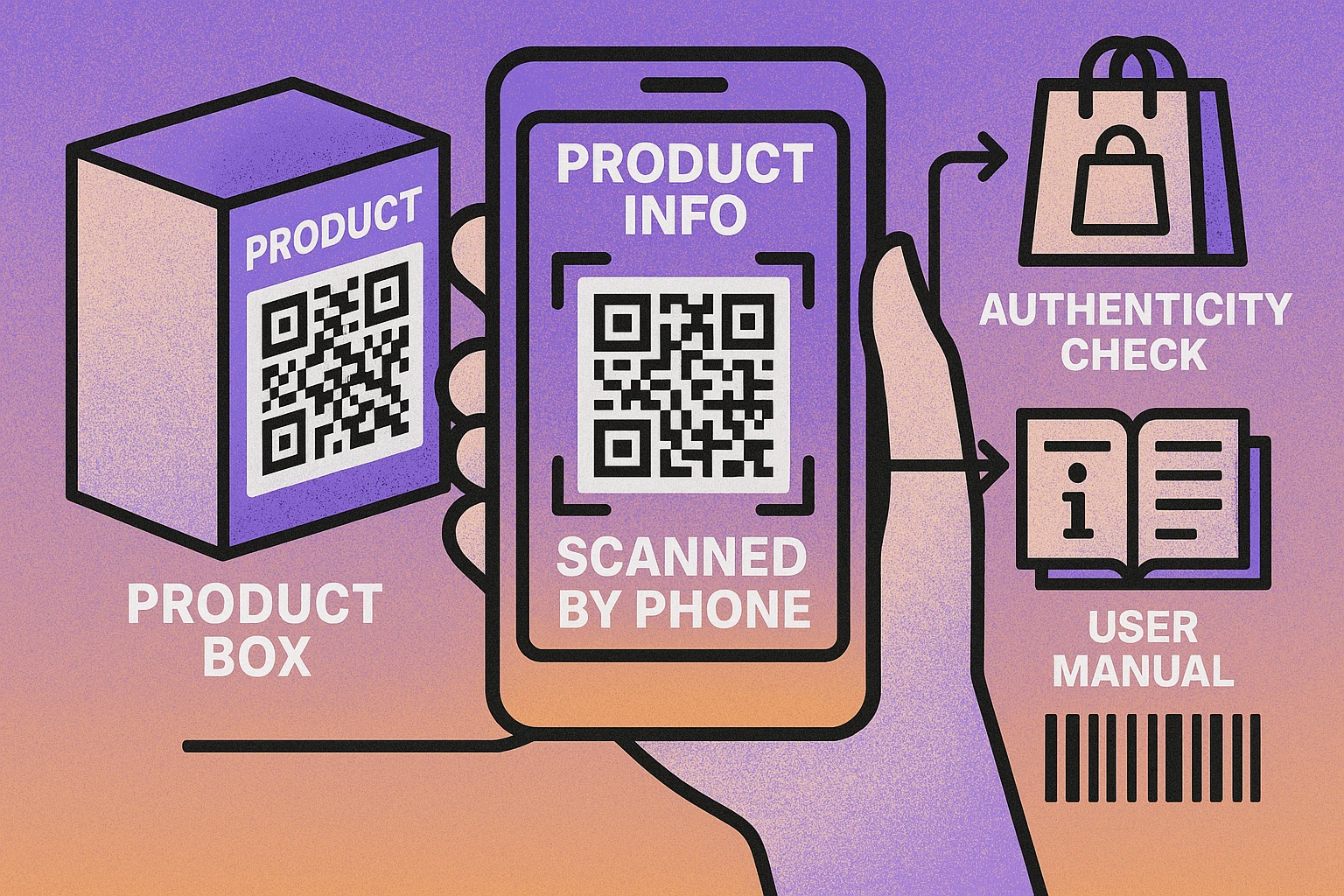
A URL QR code on packaging can be updated at any time without reprinting. If your ingredients change, your warranty terms update, or you want to link to a seasonal promotion, you simply update the destination page. The printed code stays the same.
Six Key Use Cases for Packaging QR Codes
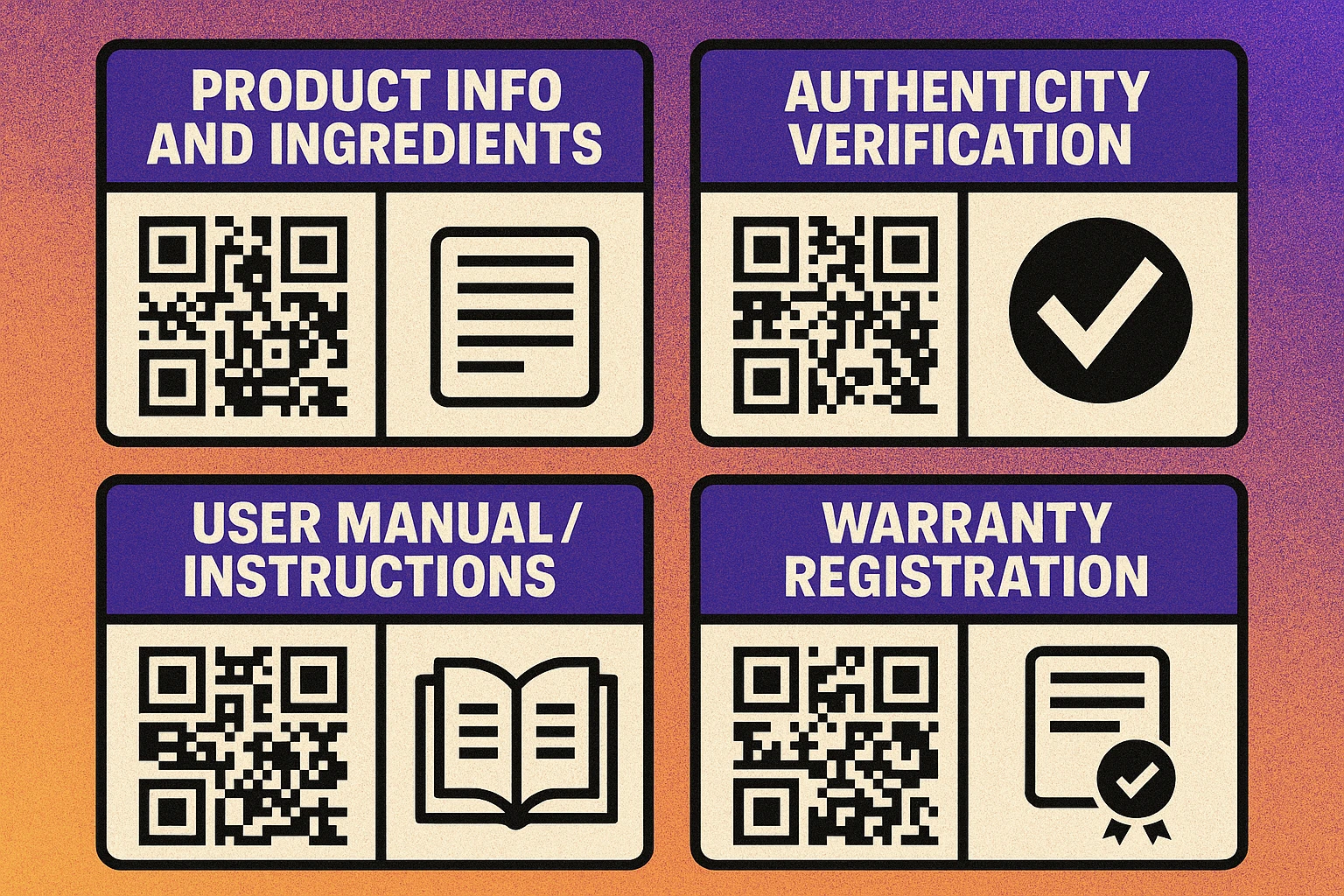
QR codes on packaging are rarely single-purpose. Most brands use a single code to serve multiple functions depending on where in the product lifecycle the consumer scans it. Here are the six most valuable applications.
1. Extended Product Information
Physical labels can only hold so much text. A packaging QR code can link to a full product page with high-resolution images, detailed specifications, origin stories, certifications, and allergen matrices. This is especially valuable for food and beverage brands navigating complex labelling requirements, and for cosmetics that need to list every INCI ingredient name without shrinking the type to unreadable sizes. Link the code directly to a URL using a URL QR code pointing to your most detailed product page.
2. Ingredients & Nutritional Data
Regulatory requirements for nutritional panels, allergen declarations, and ingredient lists are tightening in most markets. Rather than cramming everything onto a label in 6pt type, brands increasingly use QR codes to deliver a full digital disclosure. Consumers who need to check for allergens or track macros appreciate having this data in a scannable, searchable format on their phone. For products sold in multiple markets, the QR destination can serve localised content based on browser language.
3. Authenticity Verification & Anti-Counterfeiting
Each product unit can carry a serialised, unique QR code that links to a verification page on the brand’s own domain. When the consumer scans it, they see a confirmation that the product is genuine along with its batch number, manufacturing date, and authorised distributor. More sophisticated implementations use tamper-evident labels — the QR code is hidden under a scratch-off layer, so scanning it proves the seal was intact. Pharmaceutical, luxury goods, and electronics brands use this approach extensively. It also feeds anti-counterfeiting intelligence: the brand can monitor scan locations and flag codes being scanned repeatedly or from unexpected geographies.
4. User Manuals & Assembly Instructions
Printed instruction booklets are expensive, bulky, and disposable. A QR code on the packaging (or on the product itself) can link directly to a digital PDF manual, a video walkthrough, or an interactive setup wizard. This is standard practice for consumer electronics, flat-pack furniture, and appliances. Hosting the manual as a PDF makes it easy to update without changing the packaging. Use our guide on QR codes for PDF files to set this up efficiently.
5. Warranty Registration
Warranty registration rates from printed registration cards hover around 10–15%. A QR code that opens a pre-filled registration form (with the product SKU already embedded in the URL) dramatically reduces friction and pushes completion rates above 40% in many categories. The QR code also captures the scan timestamp, providing a reliable purchase-date proxy when no receipt is available. Manufacturers gain a first-party database of verified customers for recall notifications, cross-sell campaigns, and NPS surveys.
6. Recycling & Sustainability Information
Consumers increasingly want to know how to dispose of packaging correctly — and brands want to tell their sustainability story. A QR code can link to material composition data, local recycling locators, take-back programme details, or a carbon footprint breakdown. This use case is also becoming a regulatory requirement in several jurisdictions; see the EU section below.
Rather than creating six separate QR codes for each function, build a single smart landing page that groups all of them: product info at the top, then ingredients, then manual download, then warranty registration. One scan, everything available. This also keeps your packaging uncluttered.
Placement Best Practices
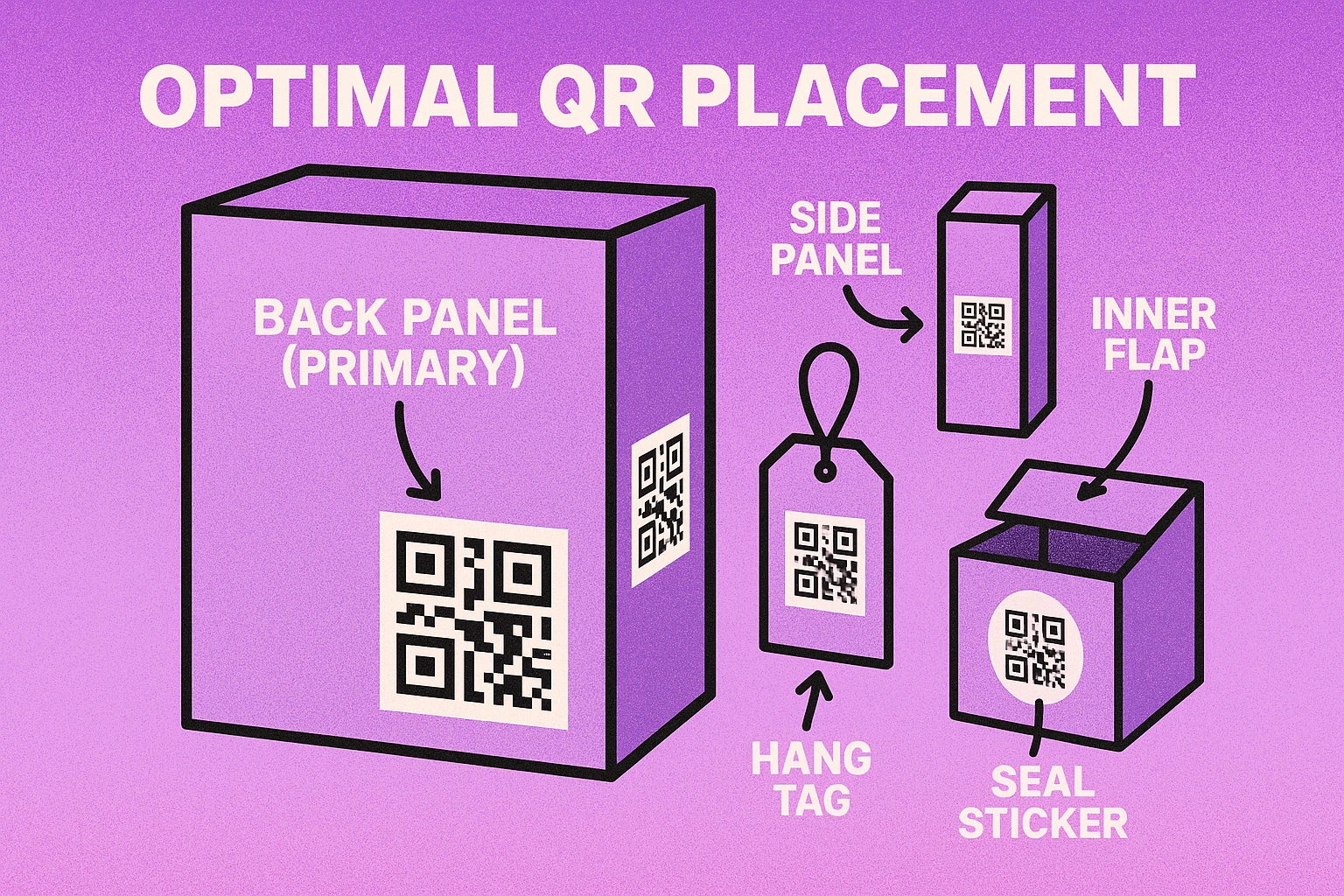
A QR code that cannot be scanned is worthless. Placement determines whether the code is physically reachable by a camera, whether the surface is scannable, and whether consumers notice it at all.
Placement Rules by Packaging Type
Flat boxes — back or side panel. The back panel is where consumers expect to find extra information. Place the QR code in the lower third, away from barcodes, to avoid scanning confusion at checkout. The right or left side panel is a strong secondary option for products displayed on shelves where the back faces the wall.
Cylindrical containers — wrap no more than a quarter. A QR code wrapped around more than about 90° of a cylinder becomes unreadable because the far edges are too severely angled relative to the camera. Keep the code on a flat or nearly flat portion of the label. For narrow bottles, use a smaller code with high error correction level H to compensate for any slight curvature.
Avoid foil, embossed, and glossy surfaces. Metallic finishes reflect light and create specular highlights that confuse camera autofocus. Embossed or debossed surfaces introduce depth variation that distorts the module grid. If you must print on a premium surface, use a matte-finish spot UV on a flat patch specifically for the QR code.
Minimum 4mm quiet zone. The blank white border around the QR code must be at least four module widths wide. On packaging, busy background graphics often encroach on this space. Reserve a dedicated white rectangle for the code before sending artwork to print.
Add a plain-text call to action. “Scan for full ingredients” or “Scan to register your warranty” printed beneath the code tells consumers exactly what they will get. Codes without context are frequently ignored. The CTA adds negligible space and measurably increases scan rates.
Generate a Packaging QR Code for Free
Create URL, PDF, and text QR codes — download print-ready PNG or SVG. No account required.
QR Code Apps for Mac & Safari
Prefer generating codes without opening a browser tab? These two native Apple apps cover both habits — a full generator on the desktop, and a one-click share button inside Safari.


Technical Requirements for Print
Getting a QR code onto packaging is not just a design task — it requires attention to print specifications that can make or break scannability.
| Parameter | Minimum | Recommended | Notes |
|---|---|---|---|
| Print size | 1.5 × 1.5 cm | 2.5 × 2.5 cm | Larger is always safer; use minimum only on space-constrained labels |
| Contrast ratio | 3:1 | 4.5:1 or higher | Dark modules on light background; never reverse (light on dark) without testing |
| Error correction | Level M (15%) | Level H (30%) | Level H essential for curved, textured, or high-use surfaces |
| Quiet zone | 4 modules | 6–8 modules | White space; never print background graphics into this area |
| Resolution (digital file) | 300 dpi | SVG (vector) | Always request SVG or EPS from your generator for print |
| Surface | Matte flat | Matte flat, white background | Avoid foil, gloss, embossed, or curved surfaces where possible |
Always proof-print the packaging and scan the QR code before approving the final print run. Test with at least three different smartphones — including an older model with a lower-quality camera — under the lighting conditions where the product will actually be used (supermarket fluorescents, outdoor sunlight, dim warehouse). A code that passes print proofing on an iPhone 15 may fail on a budget Android under a flickering fluorescent.
EU Regulations & the Digital Product Passport
The EU Digital Product Passport (DPP), introduced under the Ecodesign for Sustainable Products Regulation (ESPR), is the most significant regulatory development for packaging QR codes in years. It requires manufacturers placing products in the EU market to attach a data carrier — in most implementations, a QR code — linking to a standardised dataset covering materials, repairability, recycled content, and end-of-life information.
Battery products are already subject to DPP requirements under the EU Battery Regulation. Textiles, electronics, furniture, and construction products are being phased in from 2026 onwards. The DPP data must be stored in a format accessible via a standardised registry, but the QR code on the packaging is the consumer-facing access point.
If you sell products in the EU, begin planning your packaging QR infrastructure now. The DPP requires the data carrier to remain legible for the full product lifetime, which may be ten or more years. Build your QR URL strategy around permanent, stable URLs — not short-term campaign links. Read our full guide on the EU Digital Product Passport and QR codes for implementation details.
Outside the EU, several other markets are introducing similar requirements. Brazil’s ANVISA has proposed QR code mandates for pharmaceuticals. Canada and Australia are exploring digital labelling standards for food and supplements. The global trend is clear: QR codes on packaging are moving from optional engagement tool to mandatory compliance infrastructure.
Frequently Asked Questions
A QR code on product packaging can link to a wide range of content: full ingredient or material lists, allergen disclosures, nutritional data, setup guides, video tutorials, PDF user manuals, warranty registration forms, authenticity verification pages, recycling instructions, and brand story pages. Because the QR code just contains a URL, the destination can be updated at any time without reprinting the packaging.
The back panel is the most common location and the first place consumers look for extra information. For flat boxes, the bottom panel is a good secondary option. On cylindrical containers, wrap the QR code around no more than a quarter of the circumference to prevent distortion. Avoid embossed surfaces, foil finishes, and curved edges that cause parallax when scanning. Always ensure at least 4mm of white quiet zone around the code.
Yes. Each unit can be assigned a unique QR code that links to a serialised verification page on the brand’s website. When the consumer scans it, they see confirmation that the product is genuine along with its manufacturing date and batch. For higher-security applications, the code can be printed under a scratch-off layer so that scanning it reveals whether the seal has been broken. This approach is widely used in pharmaceuticals, luxury goods, and electronics.
The recommended minimum print size for a QR code on packaging is 2 cm × 2 cm (approximately 0.8 × 0.8 inches). Below this size, smartphone cameras may struggle to resolve the modules reliably, especially on curved or textured surfaces. If the packaging surface is matte and flat, you can safely go down to 1.5 cm × 1.5 cm, but always test with multiple devices before committing to the final print run.
The EU Digital Product Passport (DPP), part of the Ecodesign for Sustainable Products Regulation (ESPR), will require many product categories sold in the EU to carry a data carrier — most commonly a QR code — linking to detailed sustainability, material, and repairability information. Categories including batteries, textiles, electronics, and construction products are being phased in from 2026 onwards. Brands selling into the EU market should begin planning their packaging QR infrastructure now.